
6 Best Snowplow Alternatives in 2026
Choosing the right data collection tool is a significant decision that affects your entire team.
Snowplow has earned its reputation for power and flexibility, but its specific approach doesn’t automatically make it the perfect fit for every company.
You might need a simpler setup, a different pricing model, or a solution that requires less daily maintenance.
That’s why evaluating different tools is a wise move.
This guide compares the best Snowplow Alternatives available now, focusing on what each does well, how they integrate with your other business tools, and the total cost of ownership.
Let’s break down Snowplow and why your team might look at other options.
Why You Should Look For Snowplow Alternatives?
Snowplow is a data analytics platform focused on event tracking and behavioral data collection.
Its purpose is to capture detailed user interaction data from your digital products (like websites, mobile apps, and servers). It then validates and delivers the data to a destination you specify, such as a data warehouse.
Snowplow gives you full control over your data. You define what an event means, its properties, and data types. This results in incredibly rich and structured data that is perfect for data scientists and engineers to build complex models, reports, and machine learning features.
However, the very reasons Snowplow is powerful are also what make it restrictive for many organizations.
- Requires significant technical expertise and setup.
- Doesn’t include out-of-the-box analytics dashboards.
- Uses source-available licensing with restrictions.
- Can have higher operational costs and maintenance overhead.
- It may be too much for teams that need simple, quick analytics solutions.
If you want an analytics solution that provides actionable insights with little setup or technical work, here are some alternatives worth considering.
Vemetric
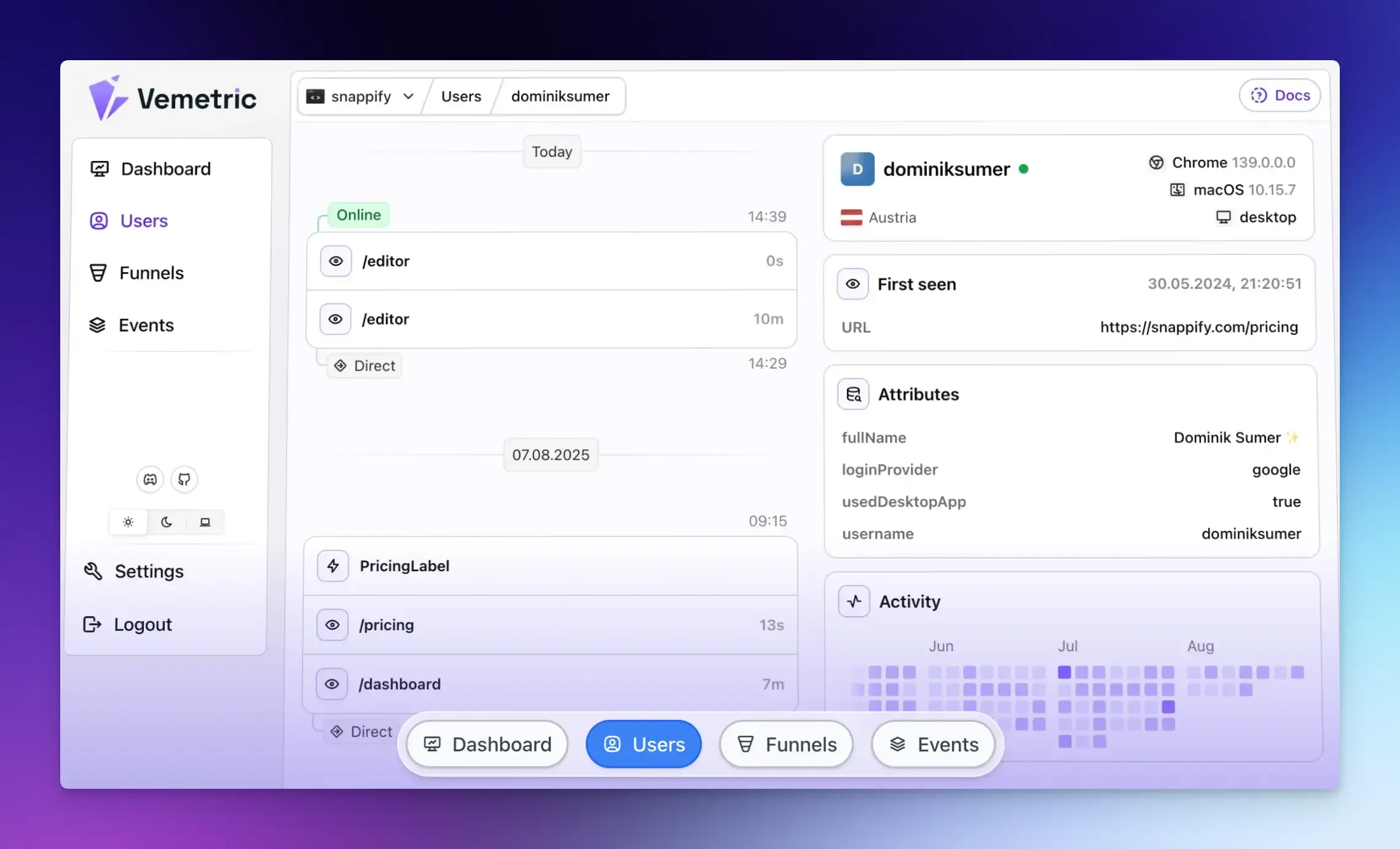
Vemetric is an open-source, privacy-focused analytics tool that helps you understand how people use your website or web application. It’s simple, built-in dashboard tracks everything from simple page visits to complex user actions.
Vemetric provides several ways to understand your users and your product.
With web analytics, you can see standard website engagement metrics:
- Page views
- Unique visitors
- Top countries
- Best referring sources
- Bounce rates
- Session durations
User Journey Tracking helps you track individual users (anonymously or logged in) across sessions and devices. You can see the sequence of actions each user took, from the first visit to key events they triggered.
Combine user journeys with funnels to see exactly where users drop off, so you can improve user behavior and optimize conversion rates.
You can filter the data by:
- Event name
- User attributes
- Campaign or source
You can also define and track custom events that matter to your product.
Other useful features include:
- Monitor Events in Real Time in a chronological stream, with options to filter for specific users or events.
- Privacy-First and GDPR Compliant: No cookies by default and EU data hosting.
- Open Source Code for transparency.
- Developer-Friendly SDKs for popular frameworks and straightforward integration.
Who is Vemetric Best For?
The platform fits well for startups, SaaS founders, and product teams looking for:
- Affordable pricing and easy setup.
- Product usage and web performance analytics in one place.
- Privacy-first tracking and control.
Pricing:
- Free plan includes 2,500 events/month and 1 month of data retention.
- The paid plan starts at $5 per month and consists of 10,000 events and 5 years of data retention.
Amplitude
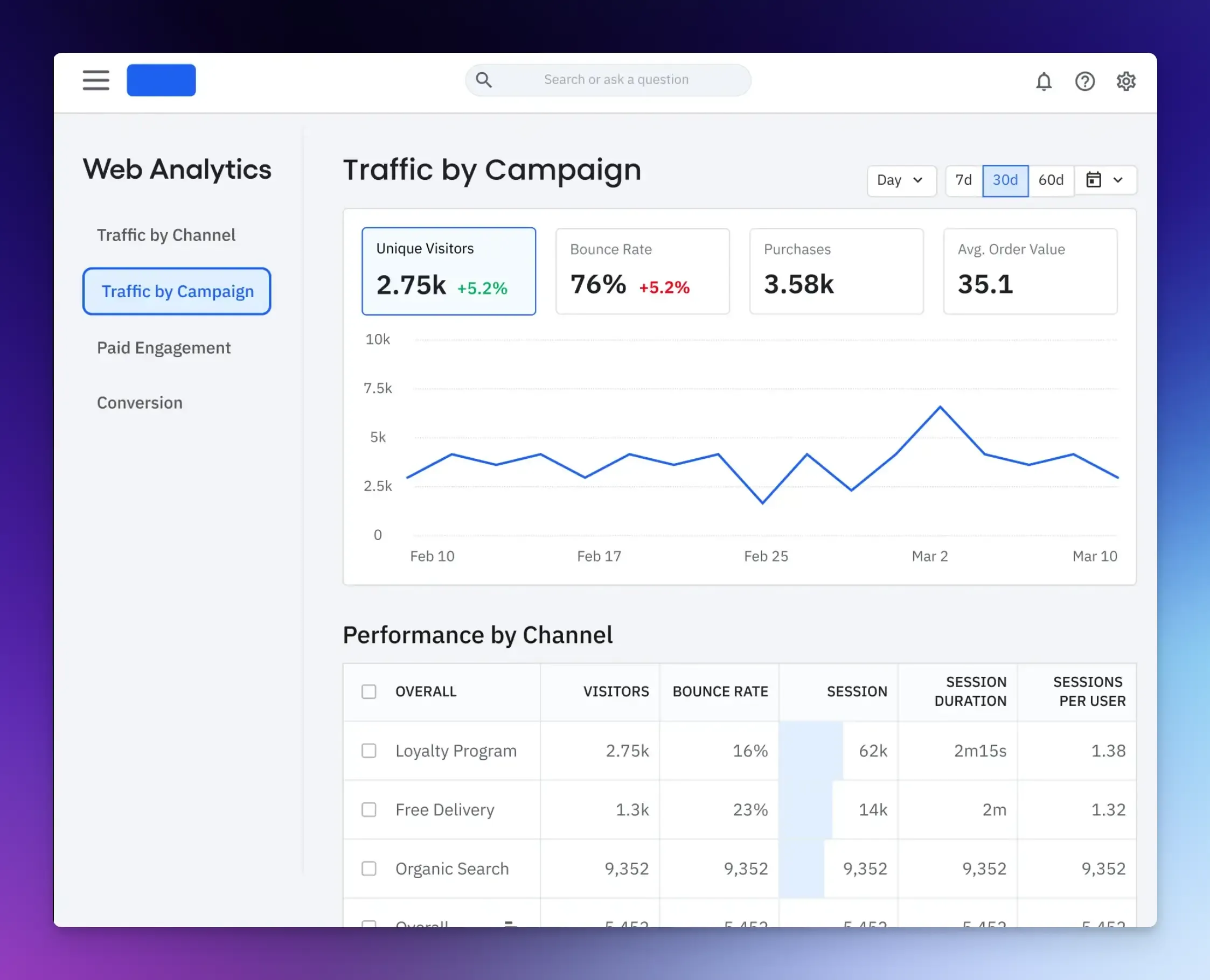
Amplitude is a popular product analytics tool that enables teams to track and analyze user behavior and improve engagement.
It’s easier to use and more feature-rich than building analytics yourself, and a good Snowplow alternative when you want standard insights rather than raw event streams.
Once you define an event, Amplitude captures it and shows you how often it happens. You can analyze this data by device type or location to see how different user groups behave.
Key features include:
- Behavioral Analytics: Funnel analysis, retention charts, user segmentation, and event-based exploration.
- Built-In Analytics Dashboard: No need to build your own BI reports or SQL queries.
- A/B Testing and Feature Flags for safe experimentation.
- Session Replay and Heatmaps for detailed behavioral data without adding separate tools.
Who is Amplitude Best For?
It is ideal for mid to large companies and product-led teams that need:
- Self-serve analytics and actionable insights without maintaining a complex data infrastructure.
- User behavior trends and engagement metrics across web and mobile.
- Analytics plus experimentation in one tool.
Pricing:
- The free plan supports up to 10k monthly tracked users (MTUs).
- Paid plans start at $49/month and scale with your number of MTUs and required features.
Pendo
Pendo is a product experience platform that helps you understand how people use your product and then actively guide them to get more value from it.
Unlike Snowplow, which is primarily a data pipeline, Pendo combines product analytics, user feedback, and engagement tools in a single, integrated system to increase adoption and retention.
You can see:
- Which features people actually use.
- How users move through workflows.
- Where drop-offs happen.
Once you know where users struggle or miss key features, you can show them in-app guides to reduce confusion. You can also run surveys and polls inside the app, including Net Promoter Score (NPS), to get user feedback as they interact with your product.
The trade-off is less control over the raw data model in return for a shorter time to insight and the ability to act on those insights right away.
Other useful features include:
- Retroactive Analytics: You don’t have to define every event you want to track in advance. Once Pendo is installed, you can go back and analyze past user interactions on pages or features you tag later.
- Session Replays: Record user sessions to see why people behave the way they do.
- Product Engagement Score: A useful metric that combines adoption, stickiness, and growth to give you a quick health check on product engagement.
- AI Insights: Pendo AI automatically highlights trends and important patterns.
Who is Pendo Best For?
Product Managers, UX, and customer teams that want:
- Both analytics and engagement tools in one place.
- A unified view of customer experience across different applications.
- Create guides without constant engineer support.
Pricing: Available on request.
Mixpanel
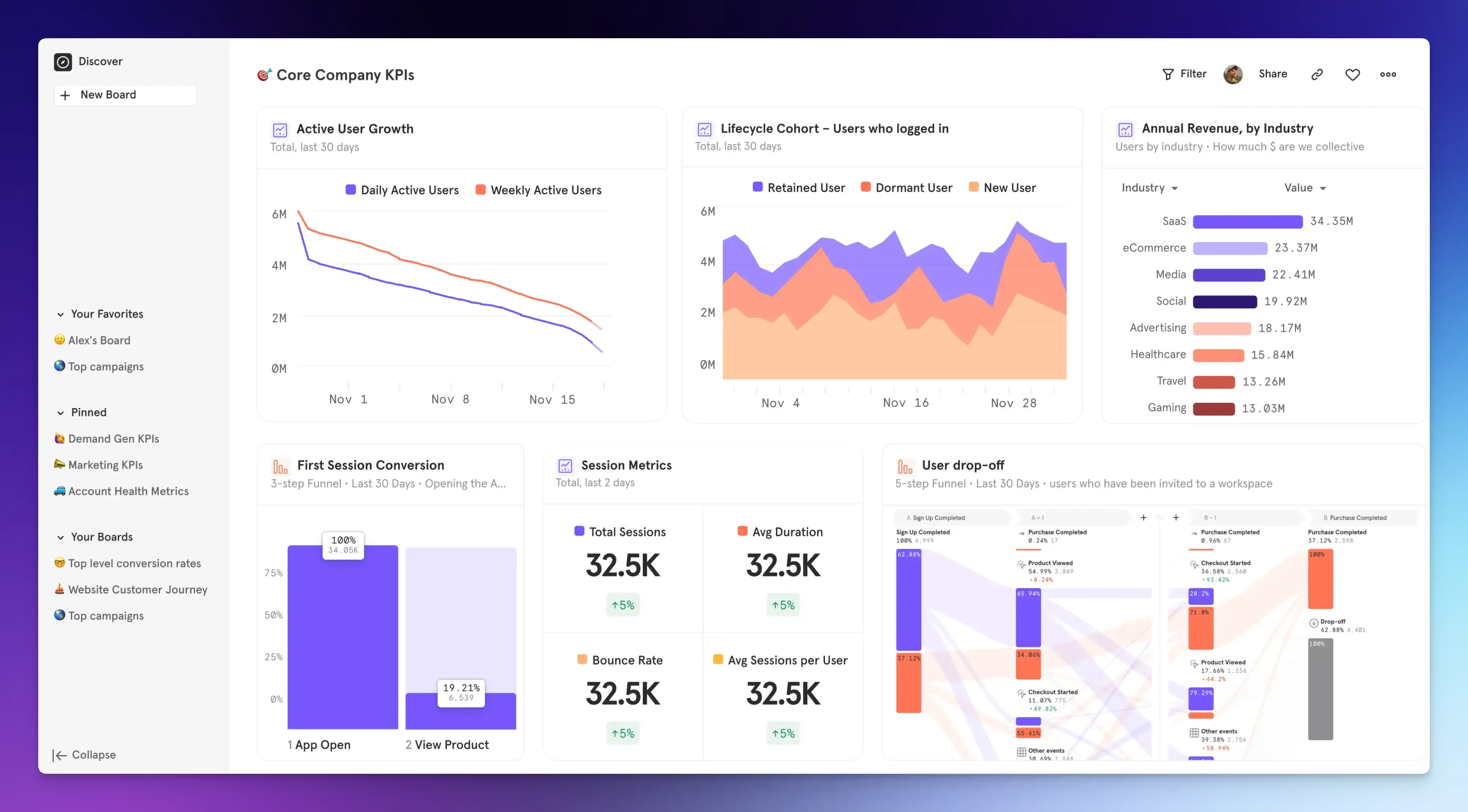
Mixpanel is another powerful digital analytics platform that helps you understand how people use your products.
It gives you built-in dashboards and reports. After you install its tracking, you’ll immediately get reports and tools for funnels, segments, and experimentation within the Mixpanel dashboard.
It offers features like:
- Event Tracking: Includes funnel, retention, and flow reports that help you analyze journeys and drop-offs.
- Segmentation and Cohorts: Create user groups based on properties or behaviors and track their performance over time.
- Session Replays: Watch real user sessions for deep customer context.
- A/B Testing and Feature Flags: Built-in experimentation tools for advanced analytics.
Who is Mixpanel Best For?
SaaS companies and digital teams looking for:
- Strong behavioral analytics with fast query speeds even on large datasets.
- Built-in reports and experimentation tools.
Pricing:
- The free plan includes 1 million events per month, with limits on saved reports and features like session replays.
- The paid plan starts at $0 for the first 1 million events, then costs $0.28 per 1,000 events thereafter.
Segment
Segment is a customer data platform that helps you collect and organize data from many tools without building complex pipelines. This means you don’t have to create separate integrations for every tool you use.
You define events once, and Segment sends them to all your platforms, including your analytics dashboard, data warehouses, CRM software, or marketing automation tool, without additional setup.
It captures events and user data such as:
- Website visits and app interactions
- Email opens and support tickets
- Purchases and logins
All the data is combined into one complete profile for each person, enabling personalized communication and reporting based on real user behavior.
Key features include:
- Data Collection: One API or SDK collects events from web, mobile, and backend sources.
- Integrations: Work with hundreds of tools without building custom code.
- Real-Time Event Streams: Events can be pushed to the destination in real time.
- Reverse ETL: Sync warehouse data back into operational tools like Salesforce, HubSpot, or marketing services to keep all your systems up-to-date with the latest data.
Who is Segment Best For?
Marketing teams and mid-size to large companies that need:
- Personalized campaigns across all channels using unified data.
- Automate data collection and send it to every destination in real time.
- Speed and integration over maintaining a custom data pipeline infrastructure.
Pricing:
- Free plan includes 1,000 visitors/month.
- Paid plan starts at $120/month and includes up to 10,000 monthly visitors.
Heap
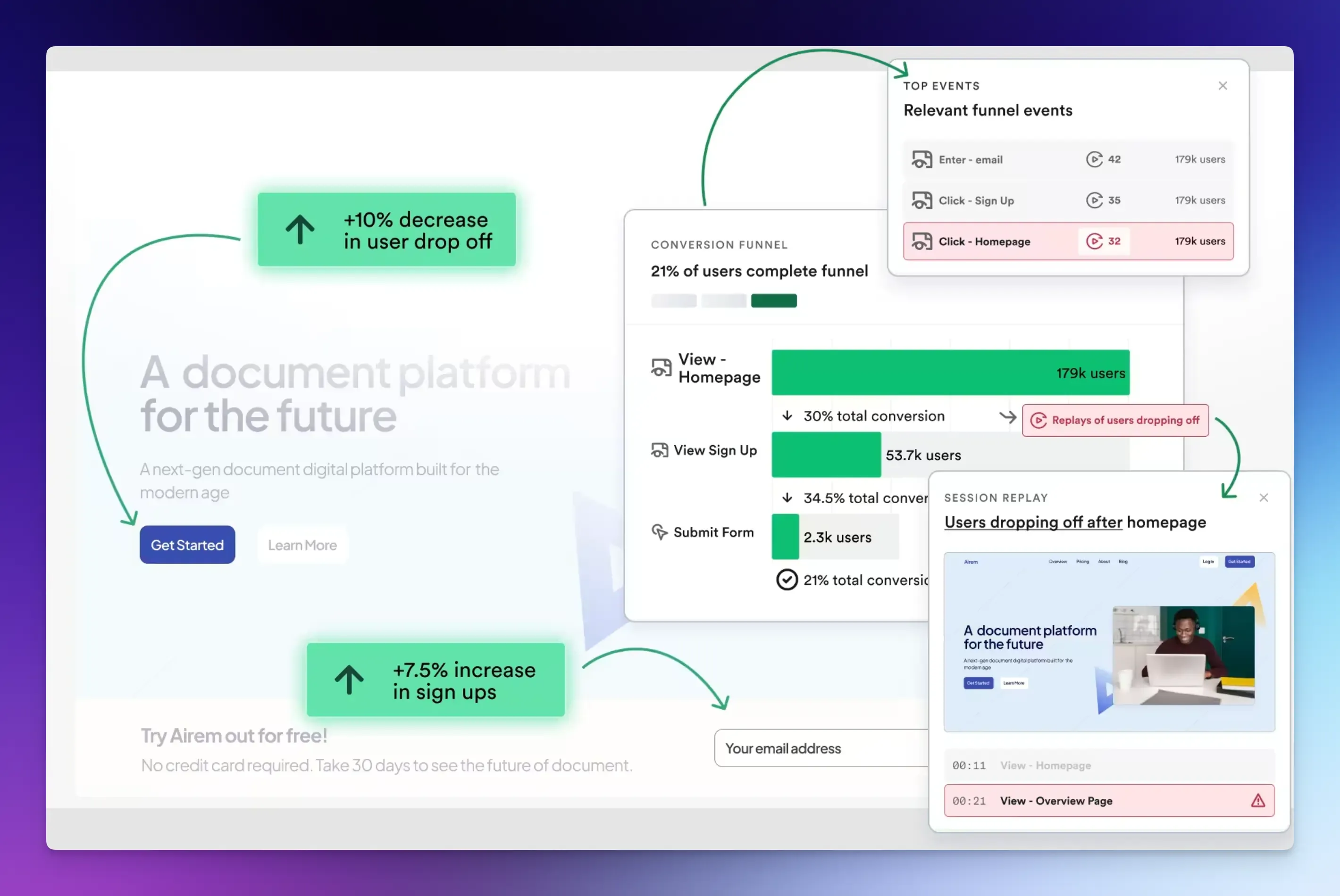
Heap automatically captures every single interaction on your website or app from the moment you install it.
You don’t need to define in advance what you want to track. You can start exploring user behavior right away through funnels, segments, and path analysis.
Heap also supports retroactive analysis. You can define an event today and view data for it going back to the day you installed the tracking snippet. This is useful if you realize later that a specific event is important.
Other useful features include:
- Session Replay and Heatmaps: See how users interact visually. You can click from a funnel drop-off point directly to watch session recordings of users at that exact step.
- Real-Time and Cross-Platform: Data updates quickly and works across both web and mobile.
- AI Tools: Automatically analyze behavioral data to identify key insights, friction points, and opportunities.
Who is Heap Best For?
Heap is good for non-technical team members and analysts who need:
- Quick analytics and reports out of the box.
- Automatic event capture instead of manually defining everything.
Pricing:
- Free plan includes up to 10,000 monthly sessions.
- Custom pricing based on traffic and session volume.
Final Words
Choosing the right analytics solution comes down to what your team needs most.
Whether it’s quick insights with minimal setup, full control of your data, or a balanced approach, there’s a tool on this list for you.
Consider your current priorities, technical resources, and future growth plans to find the solution that best suits your workflow and allows you to make better product decisions over time.
FAQs
Event-based analytics tracks specific user actions, such as a button click or a payment completed. Session-based analytics groups user activity into a single visit, focusing on metrics such as session length and bounce rate.
Self-serve analytics tools enable non-technical users, such as product managers and marketers, to analyze data and answer their own questions through a visual interface without writing code.
The most common mistake is trying to track everything at once. Start by identifying 1-3 key business goals and track only the product analytics metrics needed to measure progress on those. You can always add more tracking later.
Ready to understand your users?
Start tracking